Dual-Camera Kids Smartphone: A Fun First Phone
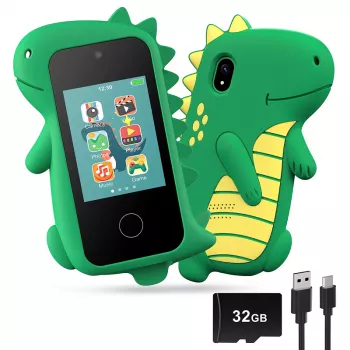
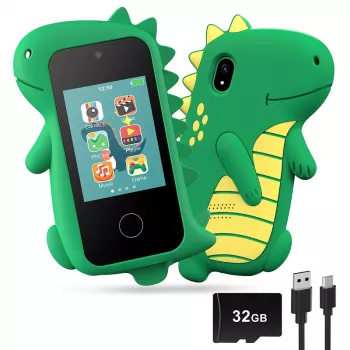
Kids Smart Phone with Dual Camera: A Fun, Kid-Friendly First Phone
A kid-focused smart phone can offer the fun of photos, simple apps, and learning games without the complexity of an adult device. A Kids Smart Phone with Dual Camera is especially appealing because it lets kids switch between front and rear cameras for selfies, everyday snapshots, and creative projects—while keeping the overall experience more approachable for younger users.
For families building healthy tech routines, it also helps to lean on established guidance around media habits and parental controls from trusted organizations like the American Academy of Pediatrics and practical setup overviews from Common Sense Media.
What Makes a Kids Smart Phone Different
Kids phones are typically designed around what children actually do most: taking photos, exploring simple games, and using straightforward features without getting bogged down in menus or complicated settings.
- Simpler navigation: quick access to the camera and kid-friendly functions.
- Smaller, easier handling: built for smaller hands and daily bumps and drops.
- Starter-device role: often used for play, photos, and basic communication routines (where supported).
- Clear boundaries: helps introduce responsible device habits with easy-to-understand rules.
Why Dual Cameras Are a Big Deal for Kids
Dual cameras aren’t just a “nice extra.” For kids, they unlock different kinds of play and make it easier to capture memories without constantly handing the phone back and forth.
- Front camera: supports selfies, video messages, and creative pretend play.
- Rear camera: usually feels more natural for everyday photos like pets, toys, and outdoor scenes.
- Storytelling boost: kids can document trips, crafts, and school projects from different angles.
- Learning-friendly: works well for scavenger hunts, photo journals, and short video clips.
Even simple activities—like “take five photos that show your day” or “make a mini nature journal”—become more engaging when kids can switch cameras and experiment.
Highlights of the Kids Smart Phone with Dual Camera
This option focuses on the features that matter most for a first kid device: a dual-camera setup for flexibility, a kid-friendly form factor for easier grip, and a straightforward purchase process when you need a gift quickly.
Quick purchase snapshot
| Item | Details |
|---|---|
| Product | Kids Smart Phone with Dual Camera |
| Price | $41.97 USD |
| Availability | In stock |
| Product page | https://farajstore1.com/kids-smart-phone-with-dual-camera/ |
Everyday Uses: From Playtime to Learning
A kids smart phone with dual camera can slide into daily life in small, practical ways—without needing to be the center of attention all day.
- Creative play: pretend “vlogging,” photo challenges, and role-play (director, photographer, reporter).
- Learning routines: timers for homework breaks, simple educational apps (where available), and photo-based projects.
- Family memories: kids can take their own pictures on outings instead of borrowing a parent’s phone.
- Organization practice: responsibility habits like charging, putting the device away, and keeping track of it.
Over time, kids often become surprisingly proud of their “camera roll projects”—like documenting a LEGO build from start to finish or capturing a step-by-step craft to show grandparents.
Kid-Safe Setup Tips Parents Usually Appreciate
A smooth setup matters as much as the phone itself. A few small guardrails can reduce arguments, limit accidental damage, and keep the device fun instead of frustrating.
- Set clear rules early: define where the phone is allowed, when it can be used, and what apps are permitted.
- Create a charging routine: same place, same time (for example, after dinner) to cut down on lost devices and dead batteries.
- Teach photo etiquette: ask permission before taking photos of friends; don’t share images without a parent’s okay.
- Add protection: use a case or bumper and consider a screen protector to reduce damage from drops.
- Make a “check-in” habit: do a quick review of photos and storage space so the camera stays ready to use.
Families aiming for healthier screen habits often find that consistent rules (and consistent consequences) work better than constantly renegotiating limits in the moment.
How to Judge Fit Before Buying
“Best” depends on the child and the goal. A great first phone for one kid might feel too big, too tempting, or too fragile for another.
- Age and comfort: look for a size and button layout that feels manageable for small hands.
- Camera expectations: prioritize ease of use and quick launching over professional-level photo quality.
- Durability needs: think about outdoor use, travel, and how often it will be carried in a backpack.
- Battery habits: a device is more enjoyable if it can make it through a typical day of kid-style use.
- Support plan: decide whether it’s for camera/play only or also for limited communication (depending on the model’s capabilities).
Care, Storage, and Simple Maintenance
Kids can handle basic device care when it’s taught like any other routine—simple, repeatable, and easy to check.
Related Gift Ideas That Pair Well
- Wooden Dollhouse with 28 Furniture Pieces for kids who love setting up rooms, characters, and photo-ready storylines.
FAQ
Is a dual-camera kids phone mainly for selfies, or does it help in everyday photos too?
It helps with both. The front camera is great for selfies and video-style play, while the rear camera is handy for everyday shots like toys, pets, and outdoor moments—plus kids can switch quickly depending on their project.
What age is a kids smart phone with dual camera best for?
Many families consider a kids phone in the early elementary range through pre-teen years, but the best fit depends on hand size, responsibility level, and whether the device is mainly for photos/play or also for limited communication.
How can parents reduce breakage and lost devices?
Use a protective case and screen protector, set a consistent charging spot, label the device, and establish simple handling rules (like “phone stays in the backpack pocket when we’re out”). A quick weekly check-in also helps catch storage and care issues early.















Leave a comment